From time to time, people I work with or in other ways interact with asks me “how do you get so many things done and how can you manage to read and take in all the stuff you learn”?
Let’s look into the Big Book of Workflow Alchemy and see what we can find.
How do I hack my day so that I can become more efficient? Do you have magic powers? Do you make up a potion in the morning or what?
Besides doing the basic stuff that you need to do to function well on a biological level, that is eat well, sleep enough and get regular exercise, I don’t really do anything magic. But there are some things I do that you can do to.
Make your own time
It sounds trivial, but if you actually plan your day, it is easier to say no to things that are not prioritized or plan them in the future.
I like to make a plan for what I want to do today and most days I write it down on one or a few Post-Its and have it on my desk. Somehow, having a physical representation of my day helps me defend my own time when people comes and asks “can you…”.
I also regulary block out my calendar so that I can do the things I have planned in the morning. Things like lunch, external meetings, gym-work or reading blocks are all there. I started using Reclaim.ai a couple months ago and have added the habbits that I want to enforce, like exercise, lunch, buffers and bike-commuting into it. Reclaim helps me move the “dynamic” blocks around and summarize the week. It also helps me synchronize between calendars, so that I get the same blocks, like lunch, in all calendars that I use. The biggest challenge has been to get the work calendar in sync.
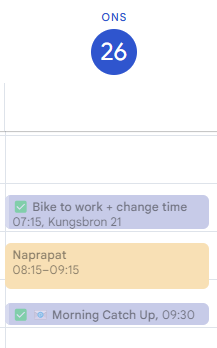
I have the following items mapped out during the day, managed by Reclaim:
- Bike to Work
- Morning Catch Up
- Lunch
- Afternoon Catch Up
- Bike home
Today, I had an appointment with my naprapath/physiotherapist so the Morning Catch Up was automatically postponed to 09:30 instead of the 08:15 that is the normal time.
Defend your time
Your time is your time. Other peoples bad planning does not automatically makes it urgent for me. As mentioned above, having your day manifested in a physical way on your desk makes if a bit harder for people comming to your desk and asking “do you have time to?”. Looking at the post-it… does not look like it.
I also try to implement the 24 hour rule for meeting requests. The rule is pretty simple: Don’t try to book a new meeting that is not at least 24 hours in the future.
My calendars are setup in such a way that it automatically responds with “Tentative” if the meeting is within 24 hours of the current time and with a message stating that “I might not see this, so make sure that you have a warm handshake if this meeting need to happen today”.
Talking about meetings. A request for a meeting that does not have a clear agenda or goal will be down prioritized. Can this meeting be a mail or a Teams/Slack conversation instead?
No hello-rule
If you send me a message over an asyncronous tool, like Teams or Slack, just don’t say “Hello, do you have time?” without actually stating what you need to ask. If you need direct contact, call me or write “Hey, I need to talk to you about the new thingy we are working on and I would like to present my solution so can we please have a call or something when you have time.”
Respect the headphones
If I have my big noise-cancelling headphones on, there is a big chance that I don’t want to be disturbed. This is the modern open landscape equivilent of closing the door to the office. Send me a mail or message or write a post-it and put it on my desk and go away. Yes, if it is really important, I will talk to you but at least then start with apologising for breaking my concentration.
Automation
A previous colleague once described me as “the hardest working laziest person I know”. And that is quite true. I am quite “lazy”. Or to be more precise, I don’t like to have to do things over and over again. So I tend to automate the things I can. Like time reporting. I work as a consultant and it not uncommon for me to have to do my time reporting in several systems. And since I am a programmer, I have a little script that takes takes the numbers from the Google Sheet I use and enter them into all the systems at once.
I have other tasks that needs to be done on regular basis, and I do have most of them automated.
Use AI!
I use is Google NotebookLM a lot. It assists me in taking long documents, Youtube videos, Web site/Blog posts or other sources and allows me to use prompts to ask questions against the sources. One of the functions I use is the ability for NotebookLM to generate a pod-like summary of the sources, based on a prompt or a query. I have 20-30 minutes on my bicycle when I commute home, so that is a perfect time to listen to a summary of a long document.
As a developer, I have connected my IDEs through GitHub CoPilot to ChatGPT and Claude AI to assist me in analyzing and generating code. It is like having a really eager junior developer that I can assign tasks to. It doesn’t take away the tasks I need to do, but it makes me a lot more efficient in analyzing and writing boilerplate code. The time I gain can be used for more fun stuff. Like writing blog posts.
